Both directions are the same interface, so a round trip is two calls:
use MarkdownWord\Converter;
use MarkdownWord\MarkdownToWord;
use MarkdownWord\WordToMarkdown;

function convert(Converter $converter, string $target): void
{
    $converter->save($target);
}

convert(new MarkdownToWord('notes.md'), 'notes.docx');
convert(new WordToMarkdown('notes.docx'), 'notes.md');
What survives
For standard Markdown — headings, emphasis, inline code, links, lists, block quotes and tables — it is close to lossless, and it is worth trying before you assume otherwise.
Here is a Word document, and the Markdown the reader makes of it. The document is a real file rather than a picture of one, and it can be downloaded and opened:
The Markdown it reads back as
# Quarterly report

Some **strong emphasis** and some *emphasis*, plus `inline code` and a [link](https://commonmark.org/).

## Highlights

| **Region** | **Revenue** | **Change** |
| :-- | :-- | :-- |
| North | 1,204 | \+8.2% |
| South | 988 | \-1.1% |

## Notes

- a list
- with two items

> A block quote, indented in the way Word indents it.

```
$x = 1;
$y = 2;
```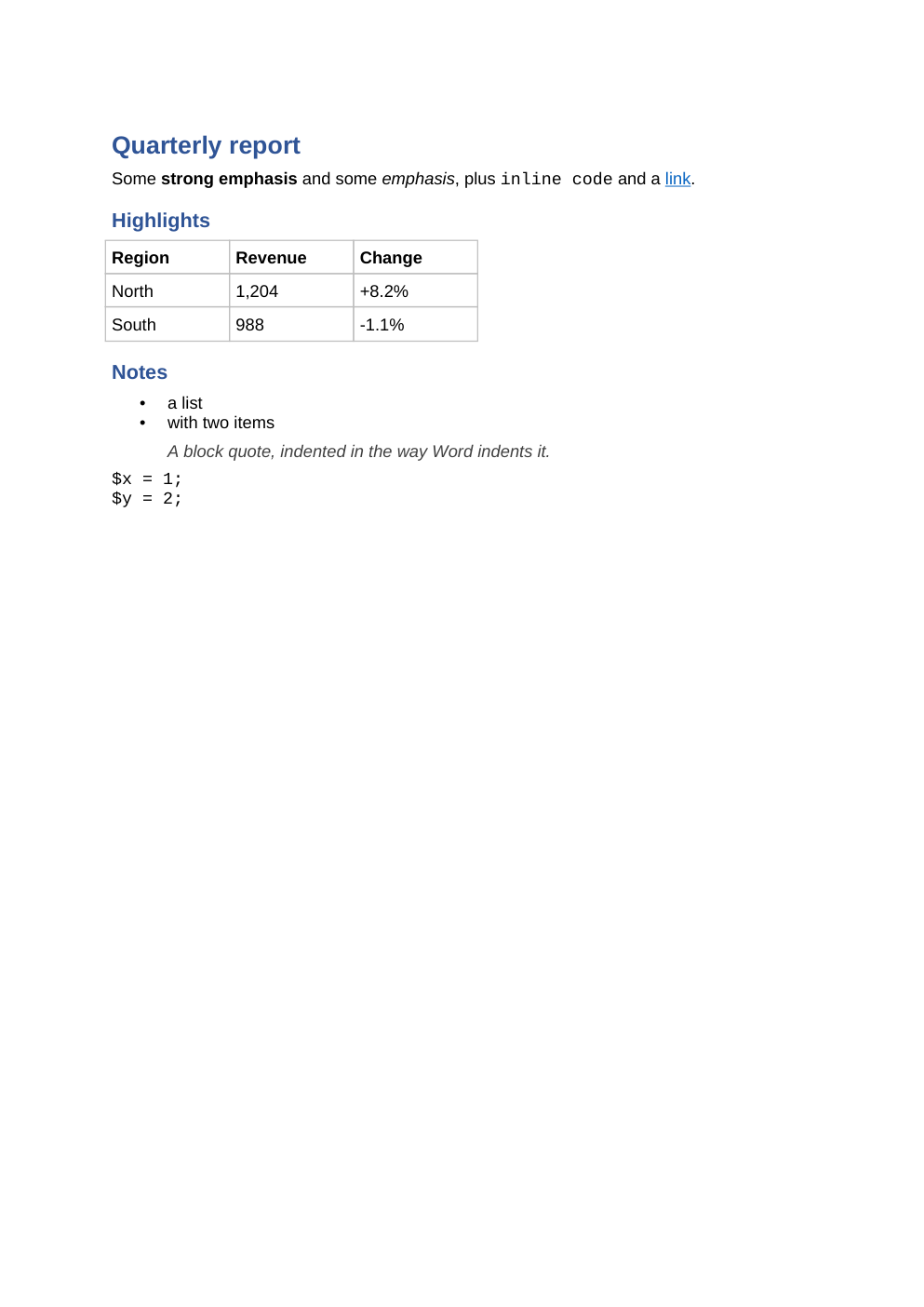
The headings, the emphasis, the inline code, the link, the table, the list, the quote and the code block all came back. What follows is what did not.
Directives do not come back
Checked, rather than assumed:
| Written | Comes back as |
|---|---|
::toc{depth=2} |
Press F9 to build the table of contents. |
:footnote[Source: the ledger.] |
:footnote[Source: the ledger.] |
The first is not a directive and never was on the way back — the document really does contain that sentence, inside the table-of-contents field, waiting for Word to build it. The reader reads the field's content and finds a sentence.
The second round trips only by accident: :footnote[…] does not currently produce a
footnotes.xml at all, so what the reader finds is the source text that was always in the body.
See Word directives.
Neither is a round trip you should build on. A pipeline that edits documents in Word and reads them back should treat directives as one-way.
What else does not survive
These are the rest of the list. Each one is a property of the formats rather than a bug, and each one is silent unless you look for it.
A table's header row comes back bold
Word records that the runs are bold, not who made them bold:
| A | B |
| - | - |
| 1 | 2 |
comes back as | **A** | **B** |. tableHeaderBold: false suppresses it.
A fenced code block comes back without its language
The fence and the text are in the file. The info string is not — Word stores no such thing — so detection is purely by monospaced typeface.
A one-line code block comes back as inline code
```php
$x = 1;
becomes `` `$x = 1;` ``, because fencing requires **two or more** consecutive monospaced
paragraphs. One is prose that happens to be monospaced.

### A quote configured as indentation comes back as a paragraph

With `blockQuote: null` there is no style id for the reader to match against, so
`quoteIndent` only measures depth *inside* an already-identified quote.

### The last line has no newline

`"# Title\n"` becomes `"# Title"`. The only exception is `lineEnding: crlf`, which adds one.

### A delimiter row is rewritten

Every column comes back as one of exactly three markers: `:--`, `--:` or `:-:`. The alignment
survives; the marker does not.

## And PowerPoint has no second direction at all

There is no `.pptx` back to Markdown: no reader class, no reverse entry point, and
`PresentationRenderer` has two methods — `render()` and `overflows()`. A deck is a thing you
present, and reading back what someone edited in PowerPoint is a much larger problem than the one
this package solves.

## Reading a document without writing one

```php
echo (new WordToMarkdown('report.docx'))->convert();       // as a string
(new WordToMarkdown('report.docx'))->save('report.md');   // straight to a file
echo (new WordToMarkdown())->toMarkdown($bytes);          // bytes already in hand
The constructor takes a path or the bytes — anything starting PK\x03\x04 is treated as a
document, an existing path is read and must start with it, and anything else is refused.
What the reader trusts
Reverse\Options is the whole vocabulary. It is worth knowing because two of its defaults are
decisions rather than facts:
| Key | Default | Notes |
|---|---|---|
headingStyles |
['Heading', 'Title'] |
case-insensitive, optional trailing level |
quoteStyles |
['IntenseQuote', 'Quote', 'BlockQuote'] |
detection by style, not indentation |
monospaceFonts |
nineteen names | how a code block is recognised |
quoteIndent |
720 twips |
per nesting level |
fenceCodeBlocks |
true |
|
tableHeader |
true |
the first row, not w:tblHeader |
headingSetext |
false |
|
mediaDirectory |
null |
only then are images extracted |
lineEnding |
"\n" |
|
maxPartBytes |
256 MiB | decompressed limit for one part |
maxEntries |
4096 | zip entries read |
maxStyleDepth |
32 | basedOn chain depth |
The last three are there because a document is untrusted input: a zip can say a part is small and be otherwise, it can carry more parts than a reader has memory for, and a style table can be a cycle.
tableHeader reading the first row rather than w:trPr/w:tblHeader is deliberate: a row
Word was told to repeat is a row the author styled as a header anyway, and reading the first row is
what survives a document that came from somewhere else.
Every example on this page was built by the library it documents while this page was built. This page as Markdown.