The dialect, the command line, and the library. In that order, because each one assumes the one before it.
composer require markdown-office/markdown-word
PHP 8.2 or newer, with ext-dom, ext-gd, ext-mbstring and ext-zip. ext-imagick is
optional and buys SVG.
1. The Markdown dialect
Basic
CommonMark, plus GitHub Flavored Markdown. Headings, emphasis, code, links, images, lists, block quotes, tables, strikethrough and task lists — all of it, and all of it walked off the syntax tree rather than flattened through HTML.
The Markdown
# Quarterly report

Some **strong emphasis** and some *emphasis*, plus `inline code` and a
[link](https://commonmark.org/).

- a list
- with two items

> A block quote, indented in the way CommonMark indents it.

| Region | Revenue |
| ------ | ------: |
| North  |   1,204 |

---

Something struck through, and something done: ~~old~~ / new.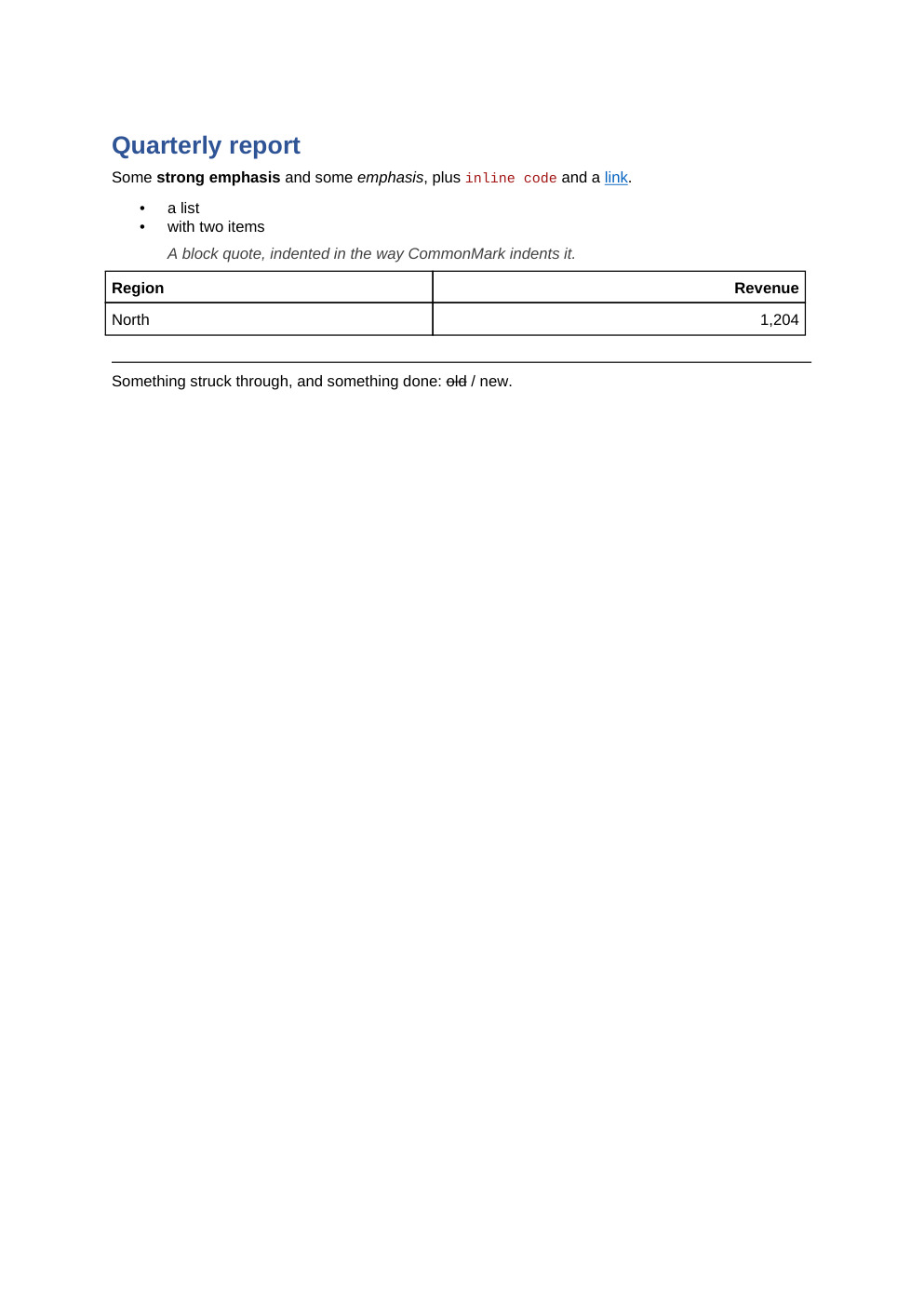
Extended: frontmatter and themes
A document configures itself. Frontmatter at the top, the behaviour under options:, the look
under styles: or theme:.
The one thing to know first. The default parser does not read frontmatter. A document
opening with options: has that block rendered as body text and the configuration ignored —
silently. The command line always reads it; in PHP you name the extensions, and
§3 shows how.
The Markdown
---
options:
  maxHeadingLevel: 2
  tableWidth: 5000
theme: corporate
---

# Quarterly report

Frontmatter configures the document that contains it, so the same file renders differently in
two pipelines without two copies of the file.

## Highlights

| Region  | Revenue | Change |
| ------- | ------: | -----: |
| North   |   1,204 |  +8.2% |
| South   |     988 |  -1.1% |
| East    |   1,533 | +12.4% |

## Notes

The `theme:` key names a look that ships with the library. Everything under `options:` and
`styles:` is yours and overrides it.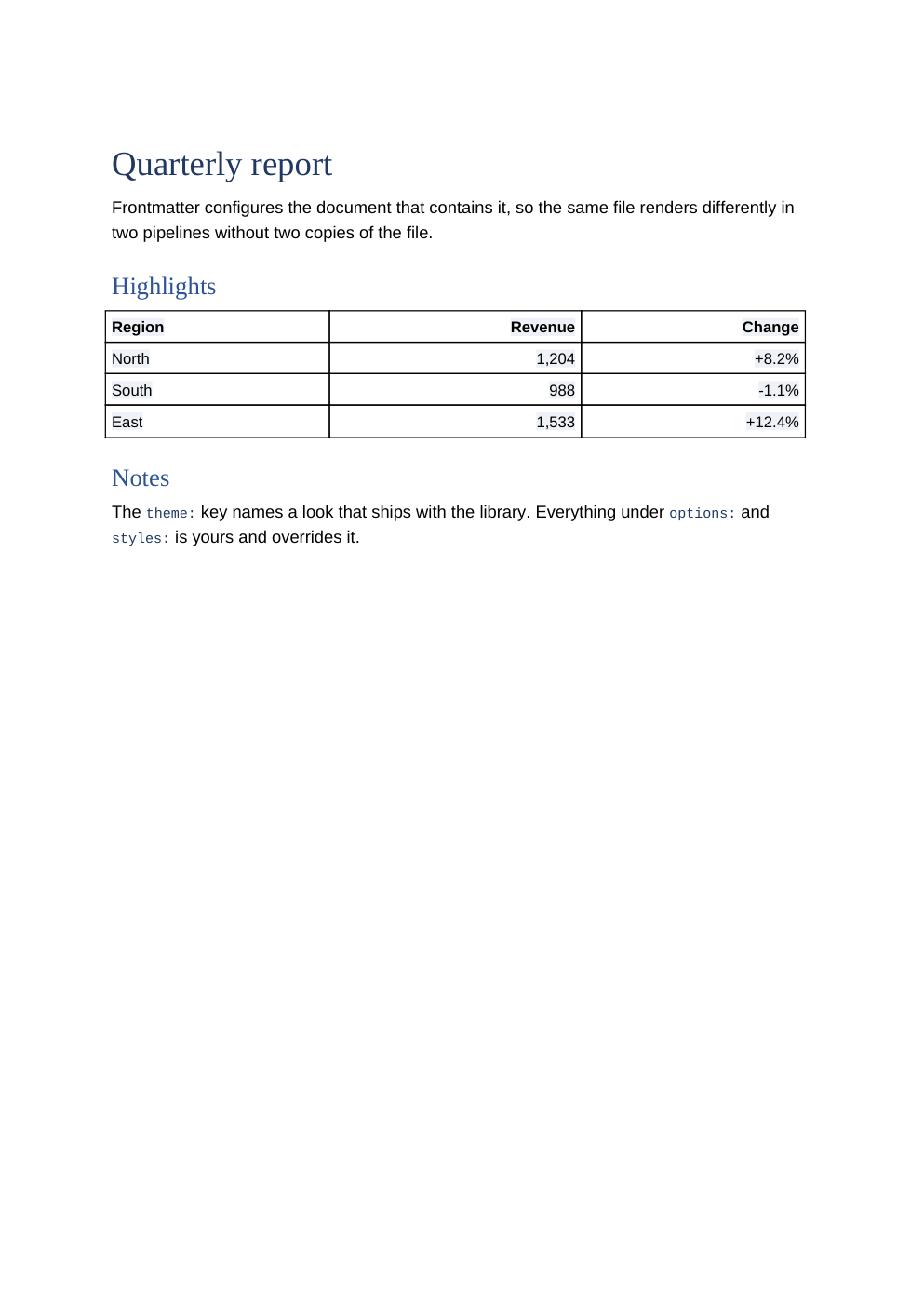
Every frontmatter key
| Key | Type | Default | |
|---|---|---|---|
options: |
mapping | absent | handed to Options::fromArray() |
styles: |
mapping | absent | handed to new Styles(...) |
theme: |
string | absent | a named look, or a path to one |
template_file: |
string | absent | a .docx or .dotx to render into |
fields: |
mapping | {} |
values for the template's MERGEFIELDs |
header: |
mapping | empty | the running head |
footer: |
mapping | empty | the running foot |
Only options: and styles: are validated. Every other key is open-ended metadata, so a document
can carry title: for a pipeline downstream that cares and be none the worse.
Every option
| Key | Type | Default | Values |
|---|---|---|---|
softBreak |
string | space |
space, lineBreak, paragraph |
hardBreak |
string | line |
remove, line, paragraph |
html |
string | strip |
strip, preserve, drop |
images |
string | embed |
embed, placeholder, skip |
imageBasePath |
string | null |
where relative paths resolve from |
imageMaxWidth |
number | 15.0 |
centimetres, ≥ 0 |
svgFallback |
string | raster |
raster, none |
maxHeadingLevel |
integer | 6 |
clamped to 1–6 |
orderedListFormat |
string | decimal |
any OOXML w:numFmt |
orderedListSuffix |
string | tab |
tab, space, nothing |
tableBorders |
boolean | true |
|
tableHeaderBold |
boolean | true |
off makes a round trip honest about headers |
tableWidth |
integer | 5000 |
fiftieths of a percent, 0–5000 |
codeBlockShading |
boolean | true |
|
linkTarget |
string | _blank |
|
thematicBreak |
string | border |
border, text |
deferredHyperlinks |
boolean | false |
Style slots
Each slot holds a style id (a string), an inline style (a mapping), or null. A mapping
merges recursively into the default; a style id or null replaces the slot whole.
| Slot | Default |
|---|---|
heading.1 … heading.6 |
Heading1…Heading6, bold, 16/13/12/11/11/11pt, 2F5496 |
paragraph |
6pt after, 1.15 line height |
blockQuote |
IntenseQuote, italic, 404040, 720 twips either side |
codeBlock |
360 twips left, no space above or below |
listParagraph |
3pt after |
codeFont |
Consolas 9pt A31515 |
linkFont |
0563C1, underlined |
Font properties are name, size, color, bold, italic, strikethrough, underline.
Paragraph properties are indentation, space, shading, keepNext, alignment, styleName,
lineHeight.
A colour is six hex digits with no # and no colour name. A size is a number ≥ 0.001, and 0
is refused with the reason: it is a size in points, and 0 makes the text invisible in Word.
Headers and footers
Both take body, align (left/center/right), border (top/bottom/both), and the
switches page, total, chapter, filename, date, firstPage, even. A body may contain
{page}, {total}, {filename}, {chapter} and {date}.
footer:
  align: center
  border: top
  body: "Page {page} of {total}"
  page: true
  total: true
Themes
A theme is a directory: theme.yml — name required, plus description and author — and an
optional styles.yml. Four ship: default, minimal, corporate, report. Resolution is a
path, then <cwd>/themes/<name>, then the package's own themes/<name>, and there is no silent
fallback — a name that does not resolve raises ThemeNotFound listing the ones that do.
Extended: directives
Two directives, and both are real Word features rather than Markdown dressed up.
::toc — a table of contents Word can build. The field goes out empty and marked dirty, with
w:updateFields set, because PHPWord's cached page numbers are all 1 and a reader who never
updates a field shows them as they are.
| Attribute | Type | Default |
|---|---|---|
depth |
integer | maxHeadingLevel, which is 6, clamped to 1–6 |
numbers |
boolean | true; false is Word's \n |
title |
string | none — a heading drawn above the field |
The Markdown
# Quarterly report

::toc{depth=2, title="Contents"}

## Highlights

The figure was provisional and has since been confirmed.

## Method

Word will build the table on open. If it does not, select it and press F9.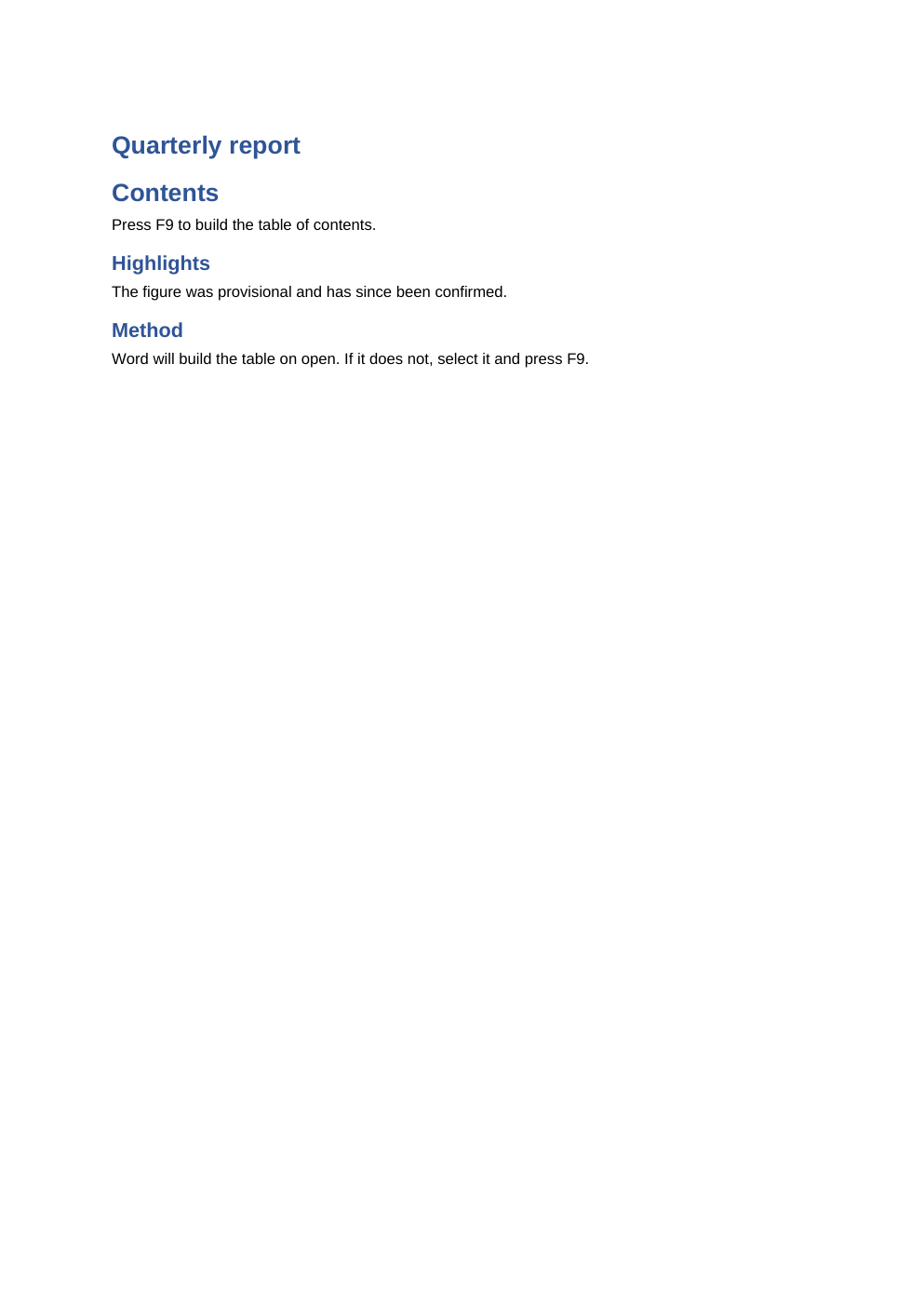
The field instruction it writes is exactly TOC \o "1-2" \h \z \u, and with numbers=false a
\n before the \h.
:footnote[…] — a Word footnote. The text in the brackets is the note, inserted as text
rather than parsed as Markdown. There are no attributes.
Measured, and it does not currently reach a footnote. Building
Body with a note:footnote[Source: the ledger.]produced a.docxwith noword/footnotes.xmlin it at all, and the literal text:footnote[Source: the ledger.]in the body. This page says so rather than describing the intended behaviour, because the build on this site checks the difference.
Everything else parses and is written into the document as the text the author typed.
Status :green[go] before lunch. parses, and reaches the document exactly as written. That is the
opposite of the presentation half's policy, and deliberate — a parser nobody asked to change
should not change the syntax of every document converted after it.
More, including what a :::toc container does: Word directives.
2. Command line
The command line for this half is mdoffice, one
program over both converters. It is not part of this package: this is a library, and
vendor/bin/mdword no longer exists. What it does is what this library does.
mdoffice word README.md          # writes README.docx
mdoffice word README.docx        # writes README.md
It decides which way the data has to go from the content, not the name: a Word document is a zip and Markdown is text, and the four bytes that say which is which are part of the format.
| Command | Does |
|---|---|
to-docx |
Markdown to .docx |
to-odt |
Markdown to .odt |
to-rtf |
Markdown to .rtf |
to-markdown |
a Word document to Markdown |
| Option | Value | Default |
|---|---|---|
-o, --output <file> |
path | beside the input; - for standard output |
-c, --config <file.php> |
path | none |
--theme <name> |
name or path | the frontmatter's theme: |
-t, --template <file> |
.docx or .dotx |
none |
--require-control |
flag | off |
--images <mode> |
embed, placeholder, skip |
embed |
--no-images |
flag | shorthand for --images skip |
--image-base <dir> |
path | the input's directory; the working directory for standard input |
--svg-fallback <mode> |
raster, none |
raster |
--table-width <n> |
fiftieths of a percent; 0–5000 | 5000 |
--plain |
flag | off |
--to <format> |
docx, word for to-docx; odt for to-odt; rtf for to-rtf |
the command names the direction |
-h, --help |
flag | off |
to-markdown takes --media <dir>, --line-ending <lf|crlf>, --setext, --no-fence and
--no-header instead.
A filter, not a command that needs a filename:
cat notes.md | mdoffice word --to docx - -o - | pbcopy
Exit 0 on success, 1 for a bad input or a configuration problem, printed as the sentence
alone because it is the caller's mistake to fix. A defect is a different thing, and it is printed
with its class and the line it happened on.
More, including the other half, the downloads and the error messages: The command line.
3. As a library
Four lines to the first document.
use MarkdownWord\MarkdownToWord;

(new MarkdownToWord('notes.md'))->save('notes.docx');
MarkdownToWord takes either a path or the text. A string naming a file that exists is read from
it; anything else is taken as the content.
Three formats from one converter:
use MarkdownWord\Format;
use MarkdownWord\MarkdownToWord;

$converter = new MarkdownToWord('notes.md');

$converter->save('notes.docx');
$converter->convertTo(Format::Odt, 'notes.odt');
$converter->convertTo(Format::Rtf, 'notes.rtf');
The parser, if you want frontmatter
use League\CommonMark\Extension\FrontMatter\FrontMatterExtension;
use League\CommonMark\Extension\GithubFlavoredMarkdownExtension;
use MarkdownOffice\CommonMark\Directive\GenericDirectiveExtension;
use MarkdownWord\MarkdownToWord;
use MarkdownWord\Parser\CommonMarkParser;

$parser = new CommonMarkParser([
    GithubFlavoredMarkdownExtension::class,
    GenericDirectiveExtension::class,
    FrontMatterExtension::class,
]);

(new MarkdownToWord($markdown, parser: $parser))->save('out.docx');
Both, named. withAllExtensions() is not the answer either — it reads frontmatter and drops
directives, so ::toc and :footnote stop being directives and become the text an author wrote.
The available flavours are commonMarkOnly(), extended(), directives() (the default) and
withAllExtensions(). Strict mode — a DirectiveRegistry that refuses unknown names — is not
reachable from CommonMarkParser, because the extension list is a list of class names and each
is built with new.
Back the other way
use MarkdownWord\MarkdownToWord;
use MarkdownWord\WordToMarkdown;

(new MarkdownToWord('notes.md'))->save('notes.docx');
(new WordToMarkdown('notes.docx'))->save('notes.md');
Both directions implement MarkdownWord\Converter, whose whole surface is convert() and
save(). The constructor takes a path or the bytes.
For standard Markdown the round trip is close to lossless. Directives are the exception and are written down rather than glossed over — see Round trips.
What you can ask the converter
$converter = (new MarkdownToWord('notes.md'));
$converter->save('notes.docx');

$converter->pendingLosses();                // what the format could not carry
$converter->pendingImageConversions();      // what was re-encoded, and to what
$converter->pendingHyperlinks();             // for deferred rendering
pendingLosses() is empty for .docx, which carries everything. .odt and .rtf drop named
features and report them rather than letting the document quietly lose them.
Errors
One type to catch: MarkdownWord\Exception\InvalidConfiguration. UnknownConfigurationKey for
the key half and InvalidConfigurationValue for the rest both extend it.
use MarkdownWord\Exception\InvalidConfiguration;

try {
    (new MarkdownToWord($markdown))->save('out.docx');
} catch (InvalidConfiguration $error) {
    fwrite(STDERR, $error->getMessage());   // every problem at once, with "Did you mean"
}
The whole catalogue is on Errors.
Next
Markdown Presentation · The directive syntax · Word directives · Images · Round trips · Errors
Every example on this page was built by the library it documents while this page was built. This page as Markdown.